The Camelot Wheel Explained: Harmonic Mixing for Electronic Music

The Camelot Wheel maps all 24 musical keys to a numbered circle so DJs and producers can identify compatible keys at a glance. Moving to an adjacent number (up or down by 1) or switching between the A and B column at the same number guarantees a harmonically smooth transition. It eliminates the need to memorize key signatures or music theory.
What Is the Camelot Wheel?
The Camelot Wheel (also called the Camelot System or Harmonic Mixing Wheel) was developed by Mark Davis of Mixed In Key as a simplified way to represent musical key compatibility. It assigns every key a code: a number from 1 to 12 and a letter — B for major, A for minor.
The genius of the system is that compatible keys are always neighbors. If your current track is 8A, you can safely mix into 7A, 9A, or 8B. No sharps, flats, or circle of fifths required — just simple number math.
The Full Camelot Wheel Chart
Here are all 24 keys mapped to their Camelot codes. The A column (minor keys) and B column (major keys) at the same number are relative major/minor pairs — they share the same notes.
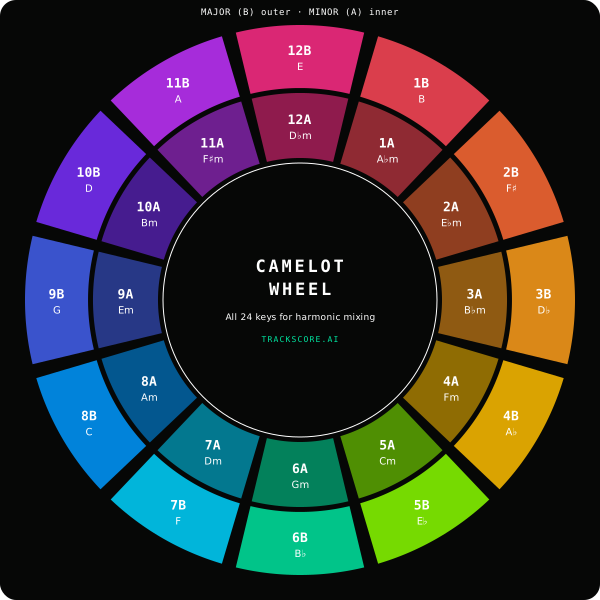
The same data in table form for quick reference:
| Camelot | Minor (A) | Major (B) |
|---|---|---|
| 1 | A♭ minor (1A) | B major (1B) |
| 2 | E♭ minor (2A) | F♯ major (2B) |
| 3 | B♭ minor (3A) | D♭ major (3B) |
| 4 | F minor (4A) | A♭ major (4B) |
| 5 | C minor (5A) | E♭ major (5B) |
| 6 | G minor (6A) | B♭ major (6B) |
| 7 | D minor (7A) | F major (7B) |
| 8 | A minor (8A) | C major (8B) |
| 9 | E minor (9A) | G major (9B) |
| 10 | B minor (10A) | D major (10B) |
| 11 | F♯ minor (11A) | A major (11B) |
| 12 | D♭ minor (12A) | E major (12B) |
How to Use the Camelot Wheel for Mixing
There are three safe moves on the Camelot Wheel. Each guarantees a harmonically compatible transition:
- Same key: Stay on the same Camelot code (e.g., 8A → 8A). Zero harmonic risk. Best for building energy within a key.
- Adjacent number (±1): Move up or down one number in the same column (e.g., 8A → 7A or 8A → 9A). This shifts the key by a perfect fifth — the most natural harmonic movement. The wheel wraps: 12A → 1A is also adjacent.
- Switch column (A ↔ B): Move between A and B at the same number (e.g., 8A → 8B). This shifts between relative minor and major — same notes, different tonal center. Creates an emotional lift (minor → major) or darkening (major → minor).
Example: Your current track is in A minor (8A). Safe transitions: A minor (8A), D minor (7A), E minor (9A), or C major (8B). A jump to F major (7B) also works — it's one step on the number and one on the letter, both safe individually.
The Energy Boost: +1 Semitone Jump
One advanced technique worth knowing: jumping up by +7 on the Camelot Wheel (e.g., 5A → 12A) raises the key by one semitone. This is a classic pop modulation — it adds a burst of energy. Use it sparingly and during a percussion-only transition to hide the key clash during the shift.
The opposite — dropping −7 (e.g., 12A → 5A) — lowers by one semitone. This creates a subtle downshift in energy that works well for cooling down a set.
Why Key Detection Matters for Producers
Even if you never DJ, knowing your track's key matters for two reasons:
- DJ compatibility: DJs filter tracks by key when building sets. If your track's key metadata is wrong (or missing), it gets skipped. Correct key tagging makes your music more playable.
- Remix and mashup work: When layering vocals, samples, or stems from other tracks, matching keys prevents dissonance. The Camelot system tells you which keys are safe to combine.
- Label submissions: Many labels and distributors require key metadata. Automated detection saves you from manually identifying it (and getting it wrong).
- Production choices: Certain keys have associations — A minor and C minor are the most common in electronic music for a reason. Knowing where your track sits on the wheel helps you make intentional tonal choices.
Most Common Keys in Electronic Music
Minor keys dominate electronic music — they carry the tension, energy, and darkness that dancefloor music thrives on. The most common Camelot positions in electronic music:
| Camelot | Key | Common In |
|---|---|---|
| 8A | A minor | House, techno, progressive — the most popular key in all of electronic music |
| 5A | C minor | Dark techno, minimal, bass music — dramatic tension |
| 6A | G minor | Deep house, melodic house — warm melancholy |
| 7A | D minor | Tech house, trance — energetic and driving |
| 9A | E minor | Progressive, DnB — moody and versatile |
If you're producing tracks in this 5A–9A range, your music is naturally compatible with the largest pool of other electronic tracks — making it easier for DJs to include in their sets.
How TrackScore.AI™ Detects Key
TrackScore.AI™ uses chroma-based key detection to identify your track's key and scale. It extracts the chroma distribution (the energy at each of the 12 pitch classes) and correlates it against known major and minor key profiles. The result includes:
- Key + scale: Standard notation (e.g., “C minor”)
- Camelot code: The Camelot Wheel position (e.g., “5A”)
- Confidence: How strongly the detected key matches the audio (0–100%)
The key and Camelot code appear in your analysis metadata alongside BPM, LUFS, and duration — the essential information DJs need to evaluate whether a track fits their set.
Camelot vs. Open Key Notation
You may also encounter Open Key notation, used by Traktor and some other DJ tools. The two systems are equivalent — they just use different labeling:
| Camelot | Open Key | Difference |
|---|---|---|
| 8A | 1m | Both = A minor. Open Key uses “m” for minor, “d” for major |
| 8B | 1d | Both = C major. Different numbering, same compatibility rules |
The mixing rules are identical in both systems — move ±1 or switch major/minor. Camelot is more widely used in the Rekordbox and Serato ecosystems, while Open Key appears in Traktor.
Related Guides
- What Is Track Analysis? — How key detection fits into full mix analysis
- What Makes a Track Danceable? — The Groove Factor scoring system explained
- The Music Production Workflow — Where key selection fits in the 10-stage production process
- Best Music Analysis Tools — Tools that include key detection
Frequently Asked Questions
What is the Camelot Wheel?
The Camelot Wheel is a circular diagram that maps all 24 musical keys (12 major, 12 minor) to numbered positions from 1 to 12. Major keys use the letter B, minor keys use A. Adjacent numbers on the wheel are harmonically compatible, making it easy for DJs to mix tracks in key without music theory knowledge.
How do you read a Camelot key code?
A Camelot code has two parts: a number (1–12) and a letter (A or B). The number indicates the position on the wheel. B means major key, A means minor. For example, 8B is C major and 8A is A minor. To mix harmonically, move to adjacent numbers (7B, 9B) or switch between A and B at the same number (8A ↔ 8B).
What is harmonic mixing?
Harmonic mixing is the practice of mixing tracks that share compatible musical keys. When two tracks are in the same or a related key, the transition sounds smooth and musical. When they clash, the mix creates dissonance — an audible tension that disrupts the dancefloor energy.
Does TrackScore detect musical key?
Yes. TrackScore.AI™ detects the key and scale of every uploaded track using chroma-based analysis and displays both standard notation (e.g., C minor) and the Camelot code (e.g., 5A) in the analysis results. This helps producers verify their track's key and plan DJ sets.
Can I mix tracks that are not adjacent on the Camelot Wheel?
You can, but the further apart two keys are on the wheel, the more dissonant the transition. Jumping 1–2 positions works musically with good technique. Jumping 3+ positions usually requires quick cuts, FX, or percussion-only transitions to avoid audible key clashes.